
Nvme Ssd vs M 2 Ssd Speed: M.2 Fit and Speed
Check the interface before comparing speed: nvme ssd vs m 2 ssd speed comes down to both M.2 fit and NVMe support. Review the key details for November 2026.
 By Marcus Hale
Updated November 12, 2026
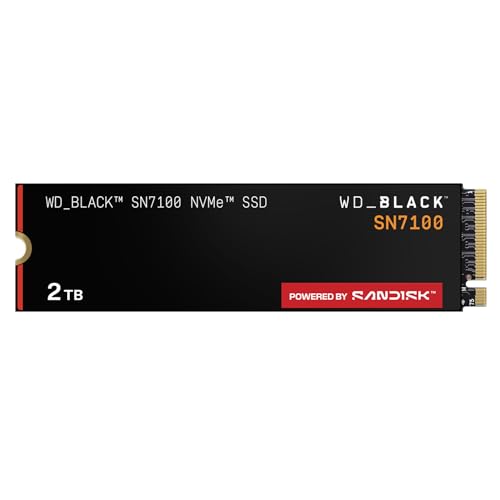
An M.2 slot doesn’t automatically mean a system supports NVMe, so checking the manual can prevent a costly mismatch. Nvme Ssd Vs M 2 Ssd Speed compares two different ideas: M.2 is a form factor, while NVMe is a storage protocol, and neither label alone tells you the whole speed story. The listed drives include PCIe Gen4 models from WD_BLACK, Kingston, and SANDISK, plus a PCIe Gen3 Silicon Power option. Their advertised maximums vary, but those figures are manufacturer specifications, not guaranteed results in every computer or workload. For a closer look at the distinction, see this guide to the difference between M.2 and NVMe SSDs.
Start with your motherboard or laptop’s supported interface, M.2 size, and available clearance; then weigh capacity against the files and games you actually keep installed. The WD_BLACK SN7100 is a 2TB Gen4 drive with manufacturer-rated speeds up to 7,250 MB/s read and 6,900 MB/s write, while Kingston’s 1TB NV3 is rated up to 6,000 MB/s read and 4,000 MB/s write. SANDISK lists the Optimus 5100 in 1TB and 2TB options, with stated maximums of 7,100 MB/s read and 6,700 MB/s write. Silicon Power’s 2TB Gen3 drive lists up to 2,200 MB/s read and 1,600 MB/s write, plus a 600 TBW rating. These differences can help narrow your shortlist, but compatibility and workload matter as much as peak speed.
| Award | Product | BNR Score About BNR ScoreThe BNR Score is our own rating from 0 to 10, based on performance, design and build, ease of use, and value. It reflects independent research and is never influenced by manufacturers, retailers, or affiliate commissions. Learn more › | |
|---|---|---|---|
| Best Overall |
WD_Black SN7100 2TB NVMe SSD - Gen4 PCIe
|
9.2/10 | Buy |
| Best Budget |
 Kingston NV3 1TB M.2 2280 NVMe SSD |
8.8/10 | Buy |
 SANDISK Optimus 5100 1TB NVMe SSD, PCIe 4.0 |
8.4/10 | Buy | |
| Best Premium |
 SANDISK Optimus 5100 2TB NVMe SSD, PCIe 4.0 |
8.1/10 | Buy |
| Best Value |
 Silicon Power 2TB NVMe M.2 PCIe Gen3x4 2280 SSD |
8.0/10 | Buy |
NVMe and M.2 SSD Buying Questions
Are M.2 and NVMe the same thing?
No, M.2 describes a drive’s form factor, while NVMe is a protocol used by many PCIe SSDs. An M.2 drive may use SATA instead, so check the motherboard or laptop manual for supported interfaces before buying.
Will a PCIe Gen4 NVMe SSD work in a Gen3 system?
Often, PCIe devices support backward compatibility, but the host system determines what works and at what generation. Check the motherboard or laptop documentation for its M.2 slot, PCIe generation, and NVMe support; don’t assume every configuration is compatible.
Do advertised sequential speeds reflect everyday performance?
No, manufacturer-rated sequential read and write speeds aren’t guaranteed for every task. Host hardware, PCIe generation, workload, and thermal conditions can affect results, while game loading and everyday responsiveness may not scale directly with peak sequential speed.
Which listed drive suits a larger game or project library?
The WD_BLACK SN7100 and Silicon Power option each list 2TB capacity, as does the SANDISK Optimus 5100 2TB. Compare available M.2 support and the listed interface, then choose capacity around your games, project files, and remaining storage needs.
Does the Silicon Power drive have a stated endurance rating?
Yes, the listed Silicon Power 2TB drive has a 600 TBW rating, and its warranty terms depend on whichever limit, warranty length or TBW, occurs first. Check the manufacturer’s current warranty details and compare that endurance figure with your workload.
About the author
Marcus Hale is a storage and PC hardware writer covering NVMe SSDs, M.2 drives, and gaming PC upgrades. He focuses on turning spec sheets, controller and cache details, and published benchmark data into clear comparisons that help readers pick the right drive for their budget.