
What Is Better Nvme or Ssd
NVMe uses the SSD storage category with a faster interface in supported systems; what is better nvme or ssd explains how interface, workload, and fit affect your choice in November 2026.
 By Priya Nair
Updated November 12, 2026
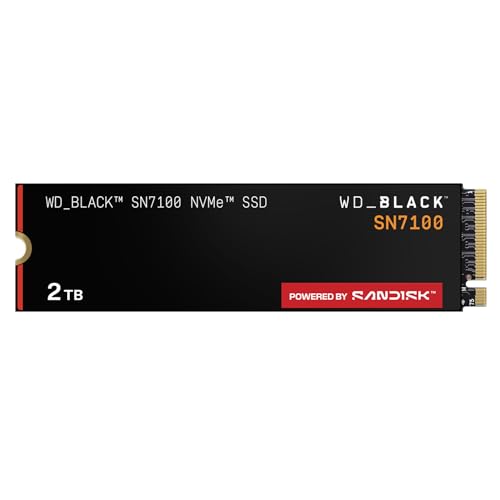
If your computer supports an NVMe drive, NVMe is generally the faster SSD interface, but it is not a separate alternative to SSD storage. An NVMe drive is an SSD, and the useful comparison is usually NVMe versus a SATA SSD, or one NVMe model versus another. That distinction makes what is better nvme or ssd a question of interface, system support, workload, and capacity rather than a simple choice between two unrelated technologies.
NVMe drives communicate over PCIe, while SATA SSDs use the SATA interface, so the potential transfer rates differ substantially. The actual benefit depends on whether the computer supports the drive and whether the workload can use its capabilities; an advertised peak read speed alone does not establish faster everyday use. Check the motherboard or laptop documentation, the available slot, and any physical clearance before choosing, and see this SATA versus NVMe explanation for the interface distinction.
Model specifications can also describe different capacities and conditions, so they should not be treated as directly measured comparisons. The listed products include PCIe 4.0 NVMe models in M.2 2280 form, with manufacturer-stated peak sequential speeds that vary by model and capacity. Those figures can help narrow a search, but they do not establish compatibility, sustained performance, or a guaranteed improvement for games, creative applications, or routine computing. This M.2 and NVMe distinction helps clarify why the connector shape alone is not enough to verify a drive.
| Award | Product | BNR Score About BNR ScoreThe BNR Score is our own rating from 0 to 10, based on performance, design and build, ease of use, and value. It reflects independent research and is never influenced by manufacturers, retailers, or affiliate commissions. Learn more › | |
|---|---|---|---|
| Best Overall |
WD_Black SN7100 2TB NVMe SSD - Gen4 PCIe
|
9.2/10 | Buy |
| Best Budget |
 Kingston NV3 1TB M.2 2280 NVMe SSD |
8.8/10 | Buy |
 SANDISK Optimus 5100 500GB NVMe SSD, PCIe 4.0 |
8.4/10 | Buy | |
| Best Value |
 SANDISK Optimus 5100 1TB NVMe SSD, PCIe 4.0 |
8.4/10 | Buy |
| Best Premium |
 SANDISK Optimus 5100 2TB NVMe SSD, PCIe 4.0 |
8.1/10 | Buy |
NVMe Is an SSD Interface, Not a Separate Storage Type
NVMe is generally the stronger choice when a system supports it and the workload benefits from PCIe storage, but NVMe is itself a type of SSD. For a practical comparison, distinguish the drive technology from the interface: a SATA SSD and an NVMe SSD are both solid-state drives, while their protocols and connection paths differ. If an existing computer only supports SATA storage, buying an NVMe drive does not make it usable in that system.
| Drive described in supplied data | Interface and form factor | Manufacturer-stated peak sequential speeds |
|---|---|---|
| WD_Black SN7100, 2TB | PCIe Gen4, M.2 2280 | Up to 7,250 MB/s read and 6,900 MB/s write |
| Kingston NV3, 1TB | PCIe 4.0 Gen 4×4, M.2 2280 | Up to 6,000 MB/s read and 4,000 MB/s write |
| SANDISK Optimus 5100, 500GB | PCIe 4.0, M.2 2280 | Up to 6,600 MB/s read and 5,600 MB/s write |
| SANDISK Optimus 5100, 1TB | PCIe 4.0, M.2 2280 | Up to 7,100 MB/s read and 6,700 MB/s write |
| SANDISK Optimus 5100, 2TB | PCIe 4.0, M.2 2280 | Up to 7,100 MB/s read and 6,700 MB/s write |
The table reports supplied product-description figures, not independent benchmark results. It also compares manufacturer claims for specific models and capacities, not controlled measurements collected under one test setup. A buyer should treat those maximum sequential rates as specification context, not a promise of everyday responsiveness, sustained transfer speed, or a particular application loading time.
These distinctions are the quickest way to frame the storage decision.
- NVMe is a storage protocol used by solid-state drives, not a different category from SSD.
- SATA describes an interface used by some SSDs and may be the relevant alternative in older systems.
- The supplied NVMe examples use PCIe 4.0 or Gen4 and an M.2 2280 form factor.
- A motherboard or laptop must support the drive’s interface and physical format.
- Peak sequential figures do not by themselves predict every application’s performance.
What the Interface Means for Everyday Work
PCIe provides the connection used by NVMe storage, while SATA is a different connection and protocol with lower potential bandwidth. That difference is most relevant when a workload moves large files or makes frequent storage requests that can use the faster path. It does not mean every task scales in proportion to the advertised maximum, because applications, processor activity, memory, and other system components also shape the result.
Starting a computer, opening a small document, or navigating an application may not produce a visible difference matching the gap between peak sequential specifications. Those activities can involve small or scattered requests rather than a long, continuous transfer. An NVMe drive can still be a sensible modern storage choice, but the specification alone cannot promise a noticeable change for each user or task.
Large media files, project assets, and repeated transfers can make storage throughput more relevant. Even then, the source and destination drive, file sizes, software behavior, available free space, and transfer duration matter. A short burst and a sustained write are not interchangeable conditions, and the supplied product data does not include comparable independent sustained-performance results.
Check M.2, PCIe, and System Support Separately
M.2 identifies a physical drive format and connector family; the label does not by itself confirm that a specific slot supports NVMe. Some systems have M.2 slots that accept SATA drives, NVMe drives, or both, while slot capabilities vary by motherboard and laptop. Confirm the supported protocol in the exact system documentation rather than relying only on the drive’s appearance or the phrase “M.2 SSD.”
Then check PCIe generation and lane support. A compatible newer drive may operate according to the platform’s supported connection rather than its maximum advertised capability, but system-specific behavior must be confirmed in documentation. Also verify that an available slot is not disabled or shared with another connection in a way that conflicts with the intended configuration.
The supplied examples have M.2 2280 formats, which describes their nominal card size, but that detail alone does not establish fit in every laptop or desktop. A laptop may impose limits on drive thickness, single-sided or double-sided layouts, or available clearance, none of which are specified for every product here. A desktop motherboard may include a cover or heatsink, so check how its arrangement interacts with the drive before installation.
Use the system maker’s model-specific compatibility information when available, and check the drive manufacturer’s documentation for product requirements. For a laptop upgrade, confirm supported capacity and whether opening the device affects service terms. For a desktop, identify the exact slot and its supported interface before purchasing, rather than assuming every M.2 slot is interchangeable.
These checks help distinguish the most common fit questions.
- Confirm the slot supports NVMe rather than assuming M.2 means NVMe support.
- Check the computer documentation for supported PCIe generation and lane configuration.
- Verify M.2 2280 support and physical clearance in the intended laptop or motherboard slot.
- Review slot sharing, disabling conditions, and available installation space in system documentation.
- Check heatsink or cover clearance and follow the manufacturers’ installation instructions.
Read Peak Speed Claims in Context
Sequential read and write values describe a particular type of transfer and are usually presented as maximum manufacturer specifications. They can be useful when comparing drives intended for large, continuous data movement, but they are not a complete performance profile. Random access, queue depth, drive capacity, firmware, operating conditions, and the test method can change results.
The supplied figures illustrate why the capacity and model need to stay attached to a speed claim. The 500GB SANDISK Optimus 5100 listing gives lower peak read and write numbers than the 1TB and 2TB listings, while the Kingston and WD_Black listings describe different products. Those distinctions do not prove one drive will outperform another in an actual computer, because no shared benchmark data or common testing conditions are supplied.
Check whether a benchmark measures a short burst, a long write, a nearly full drive, or a particular file size before using it to predict a workload. Results from different platforms should not be treated as directly comparable unless the methodology and conditions align. The product descriptions provide maximum figures, not a complete set of independent measurements under controlled conditions.
Manufacturer claims can still help shortlist a drive when a system and workload are already understood. A creator who frequently transfers large source files may care more about write behavior and capacity than a user storing a modest game library. But without directly comparable sustained results, a buyer should avoid treating a peak number as evidence of long-session performance or guaranteed time savings.
Capacity, Workload, and the Real Upgrade
Storage capacity often has a more obvious effect on day-to-day convenience than a higher peak transfer figure. Games, video projects, photo libraries, and application caches can consume space at different rates, so estimate the active files you need to keep available and allow room for future use. A nearly full drive can also leave less flexibility for updates and temporary working files, though the supplied data does not quantify how any particular drive behaves as free space changes.
For a system upgrade, compare the current drive’s interface and capacity with the replacement you are considering. Moving from a mechanical drive to an SSD can be a different comparison from moving between SATA SSD and NVMe, and neither comparison should be collapsed into a single claim about NVMe. If the existing machine lacks a compatible NVMe slot, a supported SATA SSD may be the practical solid-state option.
Among the products supplied, the Kingston NV3 listing states a five-year limited warranty and includes Acronis cloning software. The SANDISK Optimus listings describe Dashboard software for monitoring and updates, and the WD_Black listing identifies WD_BLACK Dashboard for Windows. These are product-description details; check current manufacturer documentation for software availability, supported operating systems, warranty conditions, and what is covered before relying on them.
Capacity also affects which advertised speed claim applies. A model family may list different maximums at different capacities, so do not transfer a larger-capacity specification to a smaller-capacity version without confirming the exact product page. Product names and family labels can be similar while their capacities and stated specifications differ.
Likewise, manufacturer endurance figures need exact model and capacity context, and they describe a rated write amount rather than a personal lifespan forecast. The supplied information gives an up-to-1,200 TBW claim for a 4TB SANDISK Optimus 5100 model, not for the capacities in the table. It would be inaccurate to apply that figure to the listed lower capacities or use it to predict when an individual drive will fail.
Thermals, Heatsinks, and Safe Installation
NVMe activity can create heat, but the information supplied here does not provide comparable operating temperatures, throttling measurements, or heatsink requirements for the specific products. A heatsink may be useful depending on the system and workload; it is not safe to assume that every drive requires an aftermarket one or that every motherboard cover fits every configuration. Follow the drive and system manufacturers’ guidance about thermal components.
Before installing or handling a drive, follow the computer, motherboard, and drive manufacturers’ instructions. Power down and disconnect equipment as directed, observe appropriate electrostatic-discharge precautions, and do not force the drive or heatsink into place. System-specific instructions matter, particularly in compact laptops where access and clearance can be limited.
Also check whether the system has a factory thermal pad or cover that must be used as documented. Do not stack heatsinks or remove components based on a general online assumption; consult the applicable instructions. If the device’s layout or service process is unclear, use the manufacturer’s support information rather than improvising.
Choose by Compatibility Before Peak Numbers
NVMe is generally the more capable interface for supported systems, but “better” depends on what the computer accepts and what the user needs. A supported NVMe drive can be a reasonable choice for a PCIe-equipped system, especially when file transfer demands or capacity planning make the interface relevant. An NVMe drive is not the right purchase for a system that only supports SATA in the intended slot.
For gaming, capacity, system compatibility, and the game’s own loading behavior may matter more than small differences between maximum sequential claims. For content creation, consider file sizes, write patterns, software needs, and the available capacity, while looking for comparable sustained benchmarks if those are central to the decision. Everyday users should avoid paying a premium solely for a peak specification that their common tasks may not use.
A buying comparison should use the exact model and capacity, not just brand or family name. Confirm the stated interface, physical format, warranty, and any software you expect to use, then consult current product documentation for details missing from the supplied descriptions. Warranty terms and utility software can change or vary by region, so the product listing is not a substitute for current official terms.
For benchmark-based decisions, seek results that identify the drive capacity, system, firmware, workload, and test duration. A sequential benchmark alone may not reflect random activity or long transfers, and results from dissimilar setups can mislead. Treat manufacturer maximums as specification claims and independent benchmark results as relevant only to their stated conditions.
For an upgrade, verify the slot protocol, supported capacity, M.2 dimensions, and physical clearance in the exact computer documentation first. If those checks confirm NVMe support, compare capacity and workload-relevant evidence rather than treating SSD and NVMe as separate categories.
About the author
Priya Nair is a product editor who covers PCIe generations, motherboard M.2 compatibility, and storage upgrade guides. Her work emphasizes checking slot support, lane sharing, and form factors so readers know a drive will fit and perform in their system before they buy.